Cube Field
Game Details
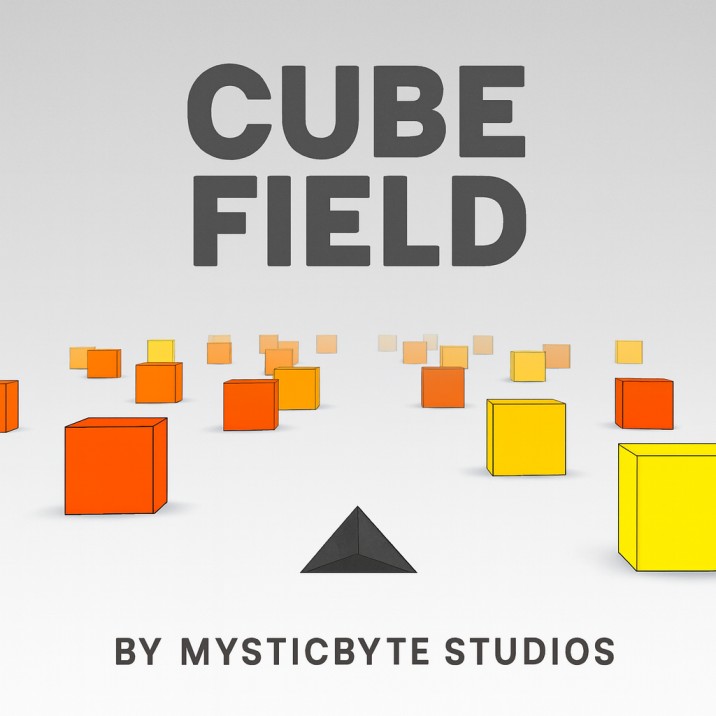
Cube Field is a fast-paced endless runner where you pilot a spaceship through an infinite field of cubes. Navigate left and right to dodge incoming obstacles as you travel forward at increasing speeds. The game features progressive difficulty with multiple levels, customizable settings for difficulty, camera angle, block behavior, and physics bounce. Score is based on survival time, with cubes spawning continuously in various sizes and patterns. Features smooth 3D graphics, dynamic lighting, thruster particle trails, and multiple visual themes that change with each level progression.
Genre: Arcade
Category: Action
Platform: Browser
HOW TO PLAY
CONTROLS:
- Desktop:
- Left Arrow Key: Move left / Steer left
- Right Arrow Key: Move right / Steer right
- Up Arrow Key: Increase forward speed (hold to accelerate)
- P Key: Pause / Unpause game
- Mobile/Tablet:
- Touch Left Half of Screen: Move left
- Touch Right Half of Screen: Move right
BASIC MECHANICS:
1. Movement System:
- Use left and right arrow keys to steer horizontally
- Movement is momentum-based with smooth acceleration and deceleration
- Hold up arrow key to increase forward speed
- Maximum horizontal speed: 0.5 units
- Maximum forward speed: 0.4 units
- Momentum gradually decreases when not pressing keys
2. Spaceship Control:
- Control a triangular spaceship in 3D space
- Spaceship rotates and tilts based on movement direction
- Positioned below the camera view
- Dynamic shadow casting for depth perception
3. Cube Obstacles:
- Cubes spawn continuously in front of the player
- 120 cubes active at any time
- Five different cube sizes:
- Small (0.08 x 0.15 x 0.06)
- Medium (0.12 x 0.25 x 0.08)
- Tall (0.15 x 0.45 x 0.10)
- Very Tall (0.20 x 0.80 x 0.12)
- Skyscraper (0.25 x 1.20 x 0.15)
- Cubes positioned randomly across the field width
- Cubes move toward the player continuously
4. Collision Detection:
- Collision occurs when spaceship overlaps with any cube
- Collision detection accounts for different cube sizes
- Collision ends the game immediately
- Returns to menu screen on collision
5. Scoring System:
- Score based on time survived (in seconds)
- Score displayed as decimal (e.g., 15.0)
- Score increments continuously while playing
- High score saved in browser cookies
- High score persists across sessions
6. Level Progression:
- Levels advance based on time survived
- New level every 30 seconds (30,000 milliseconds)
- Each level increases cube speed and difficulty
- Visual theme changes every 5 levels (5 different themes)
- 5-second break period between level transitions
7. Visual Themes (5 Different):
- Level 0/5: Beige background with brown spaceship
- Level 1: Black background with green-edged spaceship and stars
- Level 2: Gray background with black spaceship
- Level 3: White background with gray spaceship
- Level 4: Gray background with pink spaceship and white edges
8. Difficulty Settings:
- Rookie: Standard difficulty (multiplier 1.0)
- Skilled: 1.5x difficulty multiplier
- Master: 3.0x difficulty multiplier (2.5x speed increase)
- Affects cube spawn rate and game speed
9. Camera Modes:
- Hawk: Far view from behind and above (default)
- Chase: Closer chase camera view
- 1st Person: First-person perspective view
- Camera affects player positioning relative to cubes
10. Block Behavior Modes:
- Normal: Standard cube behavior (static)
- Falling: Cubes fall from above and bounce on ground
- Pop Up: Cubes emerge from below the ground
- Changes how obstacles appear and behave
11. Bounce Physics:
- None: No bouncing when cubes hit ground
- Some: Moderate bounce effect (0.4x bounce coefficient)
- Too Much: Strong bounce effect (appears to be 1.0x)
- Only applies to Falling and Pop Up block modes
- Affects cube movement after landing
12. Game States:
- Pre-game: Menu/demo mode (-1)
- Paused: Game paused (0)
- In-game: Active gameplay (1)
- Post-game: Returns to pre-game state
13. Thruster Trails:
- Visual particle effects trailing behind spaceship
- Particle trails follow movement and rotation
- Provides visual feedback for movement direction
- Only visible during active gameplay
14. Starfield Background:
- Stars appear in level 1 (and level 6, 11, etc.)
- Stars move in background during space theme
- Rotating star particles for depth effect
- Hidden during other level themes
15. Fog Effects:
- Distance fog creates depth perception
- Fog color matches current level theme
- Fog range: 5 to 25 units
- Helps create sense of speed and distance
STRATEGIC TIPS:
- Constant Movement: Keep moving left and right to avoid cubes. Don't stay in one position for too long.
- Speed Management: Use up arrow to increase speed for higher scores, but faster speeds make dodging harder. Balance speed with control.
- Pattern Recognition: Learn to recognize cube patterns. Gaps between cubes are your safe passages.
- Momentum Control: Understand momentum - stopping takes time. Plan your movements ahead of time.
- Peripheral Vision: Watch cubes approaching from distance. Early detection gives you more time to react.
- Center Positioning: Stay near the center when possible to maximize your dodging options in both directions.
- Level Preparation: During 5-second level breaks, position yourself well for the next level's cube patterns.
- Difficulty Selection: Start with Rookie difficulty to learn the mechanics, then progress to higher difficulties.
- Camera Choice: Experiment with camera modes to find what works best for your playstyle. Hawk view provides best overview.
- Block Mode Strategy: Normal blocks are easiest. Falling and Pop Up blocks add unpredictability - be ready to dodge vertically.
ADVANCED TECHNIQUES:
- Predictive Dodging: Predict cube movements and position yourself before cubes arrive. Don't wait until the last moment.
- Speed Boosting: Use forward speed boost strategically. High speeds are risky but reward higher scores faster.
- Momentum Banking: Use momentum to your advantage. Quick taps can be more effective than holding keys.
- Gap Timing: Time your movements to pass through gaps between cubes. Sometimes waiting is better than moving.
- Rotation Reading: Use spaceship rotation and tilt to judge your exact position. Visual feedback helps precision.
- Level Transitions: Use level transition breaks to assess upcoming patterns and position yourself optimally.
- High Score Strategy: Focus on survival over speed for maximum time/score. Speed increases risk of collision.
- Bounce Utilization: In bounce modes, understand cube bounce patterns. Bouncing cubes create different gaps over time.
- Theme Adaptation: Adapt to different visual themes. Some themes make cubes harder to see - be extra careful.
- Consistency Building: Practice maintaining consistent movement patterns. Predictable movement helps with timing.
WINNING AND PROGRESSION:
- Endless Challenge: Cube Field has no ending. The goal is to survive as long as possible and achieve the highest score.
- Score Milestones: Set personal score goals (10, 20, 30 seconds, etc.). Each milestone feels rewarding.
- High Score Competition: Compete with yourself to beat your personal best. High scores are saved automatically.
- Level Advancement: Progress through multiple levels. Higher levels mean faster speeds and tighter patterns.
- Skill Development: Improve your reaction time, pattern recognition, and movement precision through practice.
- Settings Mastery: Experiment with all settings combinations to find your preferred playstyle. Each combination offers different challenges.
- Difficulty Progression: Work your way up through difficulty levels. Master Rookie before attempting Skilled or Master.
- Time Records: Track your survival time. Longer survival means higher scores and level progression.
- Visual Mastery: Learn to play effectively across all visual themes. Some themes are harder to see obstacles in.
- Consistency Achievement: Achieve consistent high scores. Reliability is a sign of true mastery.
Enjoy navigating through the endless cube field and test your reflexes and precision in this fast-paced arcade game!
This is a free browser game available on MysticByte Studios. No downloads required - play instantly in your browser!